D2R Loot Filter Configurator — Build Custom Filters
Create custom loot filters for D2R by class and build. Export JSON and import directly into the game. Works with Patch 2.7+ and Reign of the Warlock.
What do you play?
Pick your classes and where you are in the game. Select multiple if you play alts.
How to Use the D2R Loot Filter Configurator
Pick Your Class
Select your class and where you are in the game. The builder generates a smart starter filter automatically in seconds.
Toggle Categories
Flip cards on or off for each item type. Expand cards to fine-tune rune tiers, gem quality, potion tiers, and gold thresholds.
Copy & Import
Copy the generated JSON content and import it directly into D2R. See the import instructions below for a step-by-step walkthrough.
Share Your Filter
Use Share URL to generate a link with your entire filter encoded — send it to friends or save it for later.
How to Import a Loot Filter in D2R
Diablo II: Resurrected added native loot filter support in the Reign of the Warlock expansion. You can import any filter JSON directly from your clipboard — no file management needed. Here's how:
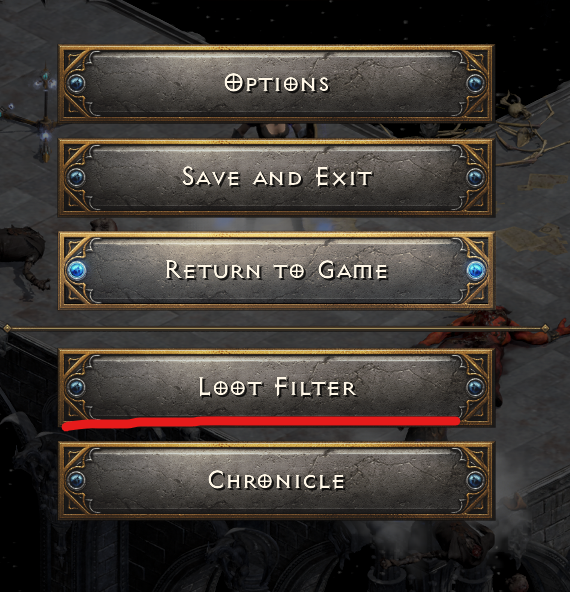
Open the Loot Filter Menu
Press ESC in-game to open the menu, then click Loot Filter. This is available in all game modes — online, offline, ladder, and non-ladder.
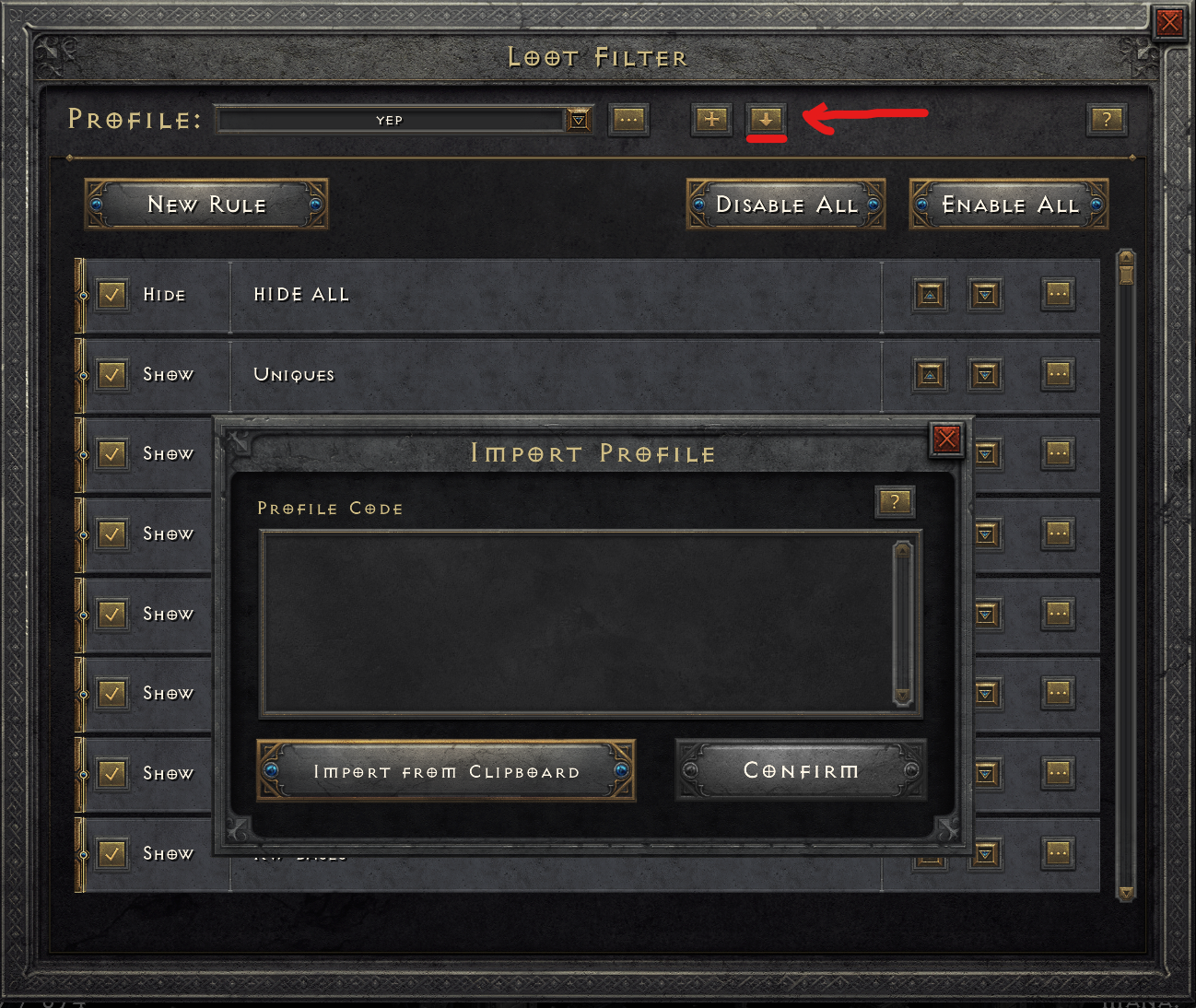
Click the Import Button
In the Loot Filter screen, look for the import button in the top-right area
(the + icon with a down arrow, next to the profile name). This opens the Import Profile dialog.
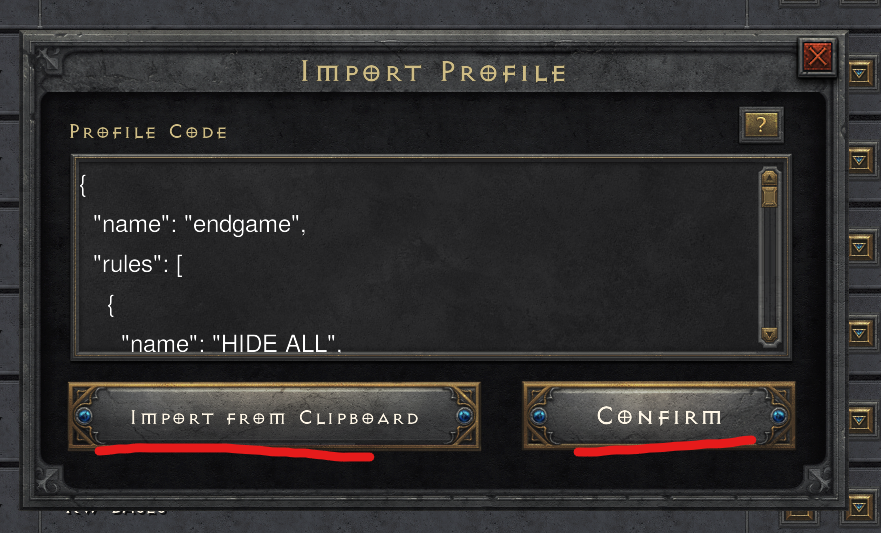
Paste and Confirm
Click "Import from Clipboard" to paste your copied filter JSON. You'll see the JSON appear in the Profile Code box. Then click "Confirm" to load the filter. Your new filter profile will appear in the dropdown — toggle it on and you're done.
Tips & Troubleshooting
- Toggle your filter in-game: Press Ctrl+Alt to enable/disable the active filter.
- Show filtered items: Press Alt (or Left Bumper on controller) to show items on the ground. The filter only applies when using Show Items.
- Items still appear on drop: This is normal — D2R shows all items when they first drop. The filter kicks in when you press Show Items.
- Filter name limit: D2R limits profile names to about 15 characters. Our builder handles this automatically.
- Console players: The clipboard import works the same way on PlayStation and Xbox — use your platform's clipboard feature.
- Multiple profiles: You can import multiple filters and switch between them using the Profile dropdown.
Frequently Asked Questions
What is a D2R loot filter?
A loot filter in Diablo II: Resurrected lets you control which items show up when you press the Show Items key. You can hide junk items (like low-quality weapons and small gold piles) and only show valuable drops like unique items, high runes, and runeword bases. Loot filters were added in the Reign of the Warlock expansion (February 2026).
Can I filter items by socket count or item level?
No — D2R's loot filter does not support filtering by socket count, item level (ilvl), or item stats. The filter can only show/hide items based on their base type, rarity (normal, magic, rare, unique, set), quality tier (normal, exceptional, elite), and whether they are ethereal or socketed (as a yes/no toggle). This is the most requested feature on the Blizzard forums.
Why do items still show on the ground after I enable my filter?
D2R's filter only applies when you press the Show Items button (Alt on PC, Left Bumper on controller). Freshly dropped items always appear on the ground — this is normal behavior, not a bug. Press Alt to apply your filter and see only the items your filter allows.
Does this loot filter builder work for all D2R classes?
Yes — the builder supports all 8 classes including the new Warlock class from Reign of the Warlock. Select your class and the builder automatically generates a smart filter with class-specific gear, recommended runeword bases, and optimized settings for your progression stage.
Can I use loot filters on console (PS5, Xbox)?
Yes — loot filters work on all platforms. Use the clipboard import feature on your console to paste filter JSON. The process is the same: copy the filter from our builder, then import from clipboard in the D2R Loot Filter menu.
Do show rules or hide rules take priority?
Show rules always override hide rules in D2R, regardless of rule order. This means you can create a "Hide All" rule that hides everything, then add specific Show rules for items you want to see. If an item matches both a Hide and a Show rule, it will always be shown.
Video Guide: Setting Up Loot Filters in D2R
Video by Zyfe — How To Set Up Loot Filter in D2R RotW
D2R Loot Filters by Class
Every class in Diablo II: Resurrected has different gear priorities. Here's what each class should focus on in their loot filter:
🏹 Amazon Loot Filter
Amazons need javelin and bow bases for runewords like Faith and Plague. Show class-specific weapons (javelins, Amazon bows, spears), Titan's Revenge, Thunderstroke, and Windforce. Don't forget ammunition — Amazons are the only class that uses arrows and bolts. Key runeword bases: Grand Matron Bow (Faith), Matriarchal Javelin (Plague).
🗡️ Assassin Loot Filter
Assassins hunt for claw bases that can roll +Trap Skills or +Lightning Sentry. Show Runic Talons and Suwayyah bases for runewords like Chaos and Fury. Magic claws with +3 Lightning Sentry are extremely valuable. Key uniques: Bartuc's Cut-Throat, Jade Talon, Shadow Killer.
⚔️ Barbarian Loot Filter
Barbarians want elite weapon bases for Grief (Phase Blade), Breath of the Dying (Berserker Axe), and Beast (Colossus Blade). Show Barbarian-specific helms for Delirium. Ethereal elite bases are premium for merc weapons. Key uniques: Arreat's Face, Dracul's Grasp, Gore Rider.
🐺 Druid Loot Filter
Druids need pelts (Druid-specific helms) that can roll +Tornado, +Hurricane, or +Summon Grizzly. Show Druid pelts across all tiers. Wind Druids want Spirit bases, Jalal's Mane, and Ravenlore. Fury Druids focus on Ribcracker and elite weapon bases.
💀 Necromancer Loot Filter
Necromancers need wand bases for the White runeword (+3 Bone Spear or +3 Poison Nova wands are ideal). Show Necromancer-specific heads (shrunken heads) for Spirit or Rhyme. Poison Nova Necros want Death's Web (the rarest wand unique). Key set: Trang-Oul's Avatar for Poison builds.
🛡️ Paladin Loot Filter
Paladins have exclusive access to Paladin shields that can roll +All Resistances — making them the best Spirit bases in the game. Show all Paladin shield tiers (Sacred Targe, Sacred Rondache, Vortex Shield). Hammerdins need Heart of the Oak (Flail base) and Enigma (Archon Plate). Key uniques: Herald of Zakarum, Highlord's Wrath.
❄️ Sorceress Loot Filter
Sorceresses rely heavily on Faster Cast Rate breakpoints. Show orb bases for runewords and unique orbs (Oculus, Death's Fathom, Eschuta's Temper). Spirit Monarch is essential for the shield slot. Magic Find Sorcs should show all unique and set items across every equipment category. Key items: Griffon's Eye, Nightwing's Veil.
🔮 Warlock Loot Filter
The Warlock is D2R's newest class, added in Reign of the Warlock (February 2026). Warlocks use Grimoires as off-hand items — a brand new equipment type unique to the class. Show all Grimoire bases (Old Book through Blasphemous Grimoire) and new Warlock-specific runewords like Void, Authority, and Ritual. Key unique: Ars Dul'Mephistos Grimoire.
⚔️ Get More Loot with Better Gear
Upgrade your D2R setup. Buying through these links supports DiabloBytes at no extra cost to you.
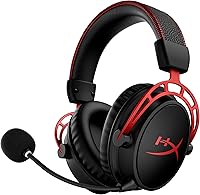
HyperX Cloud Alpha Wireless
300-hour battery life. Go wireless without ever worrying about charging mid-grind.

Skytech Archangel 5
i5-14400F + RTX 5060 + DDR5. 431 reviews, 4.3 stars. Future-proof DDR5 build.
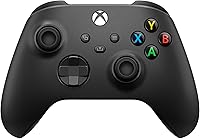
Xbox Wireless Controller (2025)
D2R has full controller support. Kick back on the couch for casual farming runs.
As an Amazon Associate, DiabloBytes earns from qualifying purchases.